
Terminal User Interfaces Are Back: What We Learned Building ltui
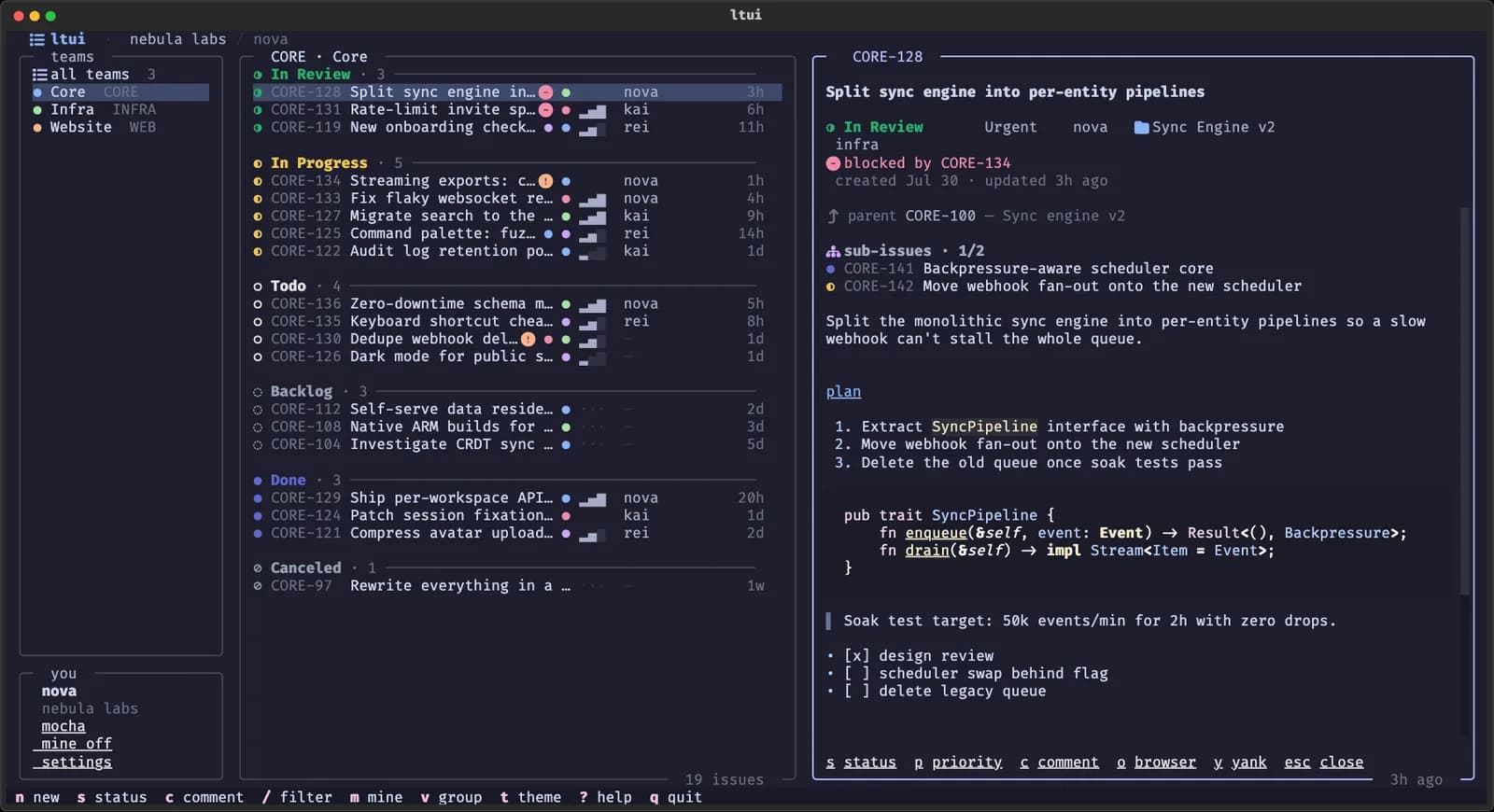
The short version: terminal user interfaces are growing again because the terminal has become a shared workspace for developers, automation, and AI agents. But a modern TUI earns its place there only when it is faster than the browser, predictable under the keyboard, honest about accessibility, and useful enough to survive after the screenshot. We learned that firsthand while building ltui, our open-source terminal UI suite for Linear, Jira, and Shortcut.
The terminal user interface, or TUI, occupies an interesting space. It is more visual and interactive than a command-line interface, but it still runs inside a terminal. A TUI can have panels, menus, tables, forms, mouse targets, themes, and live updates without becoming a conventional desktop or web application.
For a long time, that made TUIs feel like a specialist taste: beloved by people using Vim, tmux, file managers, database clients, and system monitors, but peripheral to mainstream application design. That is changing. New applications appear daily in communities such as r/tui, framework communities are active around Textual, Ratatui, Bubble Tea, and Ink, and maintained catalogs such as Awesome TUIs now span a remarkable range of work.
The interesting question is not whether terminals look cool again. They do. The interesting question is why developers are choosing to put serious software back inside them.
The terminal became the workspace
The terminal used to be one tool beside the work. Now, for many developers, it is where the work is coordinated.
Code is searched, tested, built, reviewed, and deployed there. Git worktrees and terminal multiplexers keep several tasks moving at once. AI coding agents also operate naturally in the shell because commands and their results are observable, composable, and easy to hand back to a human. Recent research on human-agent collaboration describes the terminal as valuable precisely because humans and agents can share the same representation of the work with relatively little translation (Zhang et al., Terminal Is All You Need).
That changes the cost of leaving it. Opening an issue tracker in a browser sounds trivial, but it means finding the right window, waiting for a web application, reconstructing which ticket belongs to the branch in front of you, and then returning to the terminal with that context intact. No individual step is painful. Repeating the loop all day is.
A good developer TUI reduces that context switch. It does not win merely by rendering a web product in text. It wins by fitting the operating rhythm of the terminal: immediate startup, stable keys, dense information, and a path from looking at work to acting on it.
Why modern TUIs feel different
The current generation is not simply a return to ncurses applications from another era. Modern frameworks bring component models, reactive state, styling systems, asynchronous work, richer input handling, and test harnesses to terminal applications. Textual, which powers ltui, explicitly treats the terminal as a place for sophisticated cross-platform interfaces rather than a last-resort display (Textual documentation).
Three changes matter most.
First, the terminal itself improved. Contemporary terminals handle color, Unicode, mouse input, resizing, and high-frequency rendering far better than the lowest common denominator many older applications targeted.
Second, the audience already understands keyboard-driven software. Search palettes, Vim motions, fuzzy filtering, and command launchers are no longer exotic interaction patterns among developers.
Third, open-source discovery is becoming an ecosystem rather than a collection of isolated repositories. Gheat's tuistore, for example, catalogs more than 800 terminal applications and resolves the practical question that comes after discovery: whether a tool should be installed with Homebrew, Cargo, uv, pacman, Go, npm, or something else available on the current machine.
That last point matters. Communities become durable when they develop distribution, shared components, design conventions, critique, and collaboration—not only more projects.
The problems a TUI still has to solve
Enthusiasm can hide weak software. A terminal interface is not automatically fast, accessible, portable, or ergonomic merely because it is made of text.
API latency does not disappear in a terminal
Issue tracker APIs can take seconds to return a busy board. A TUI that presents an empty frame and waits for the network has inherited the web application's delay without its conveniences.
ltui treats the cache as part of the interface. On launch, it renders the last-seen board locally in roughly 50 milliseconds, then refreshes from the tracker in the background. A small spinner in the border communicates that fresh data is in flight. When the response arrives, rows update without blocking navigation.
The larger principle is simple: perceived performance is an architectural decision. If a user must wait on a remote API before doing local work, the interface is organized around the network rather than the person.
Keyboard-first should not mean keyboard-only
Terminal software often assumes that expertise means memorizing everything. We wanted the speed of stable keys without turning unfamiliarity into a punishment.
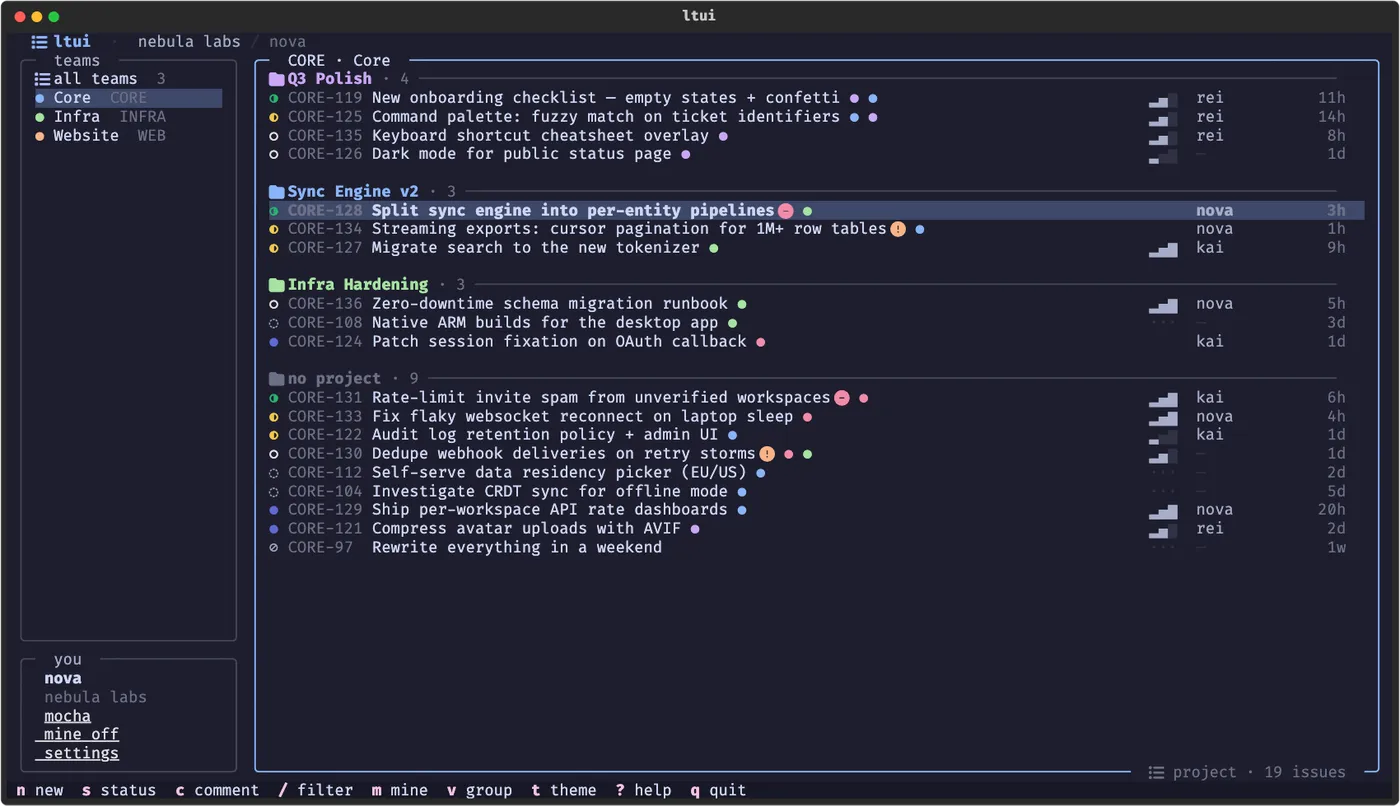
Every primary action in ltui has a key, including filtering, changing status or priority, assigning work, editing labels, opening projects, commenting, and creating tickets. Vim motions are available and every binding can be remapped. But rows, panes, actions, and dividers also respond to the mouse. First launch includes guided authentication and a short tour.
This is not a concession to less technical users. Discoverability makes expert software easier to become expert in.
Portability has more layers than “runs on three operating systems”
Linux, macOS, and Windows support is only the outer boundary. Terminal emulators differ. Fonts differ. Color palettes differ. SSH sessions differ. A beautiful glyph can become an empty square; an elegant layout can collapse at a narrow width.
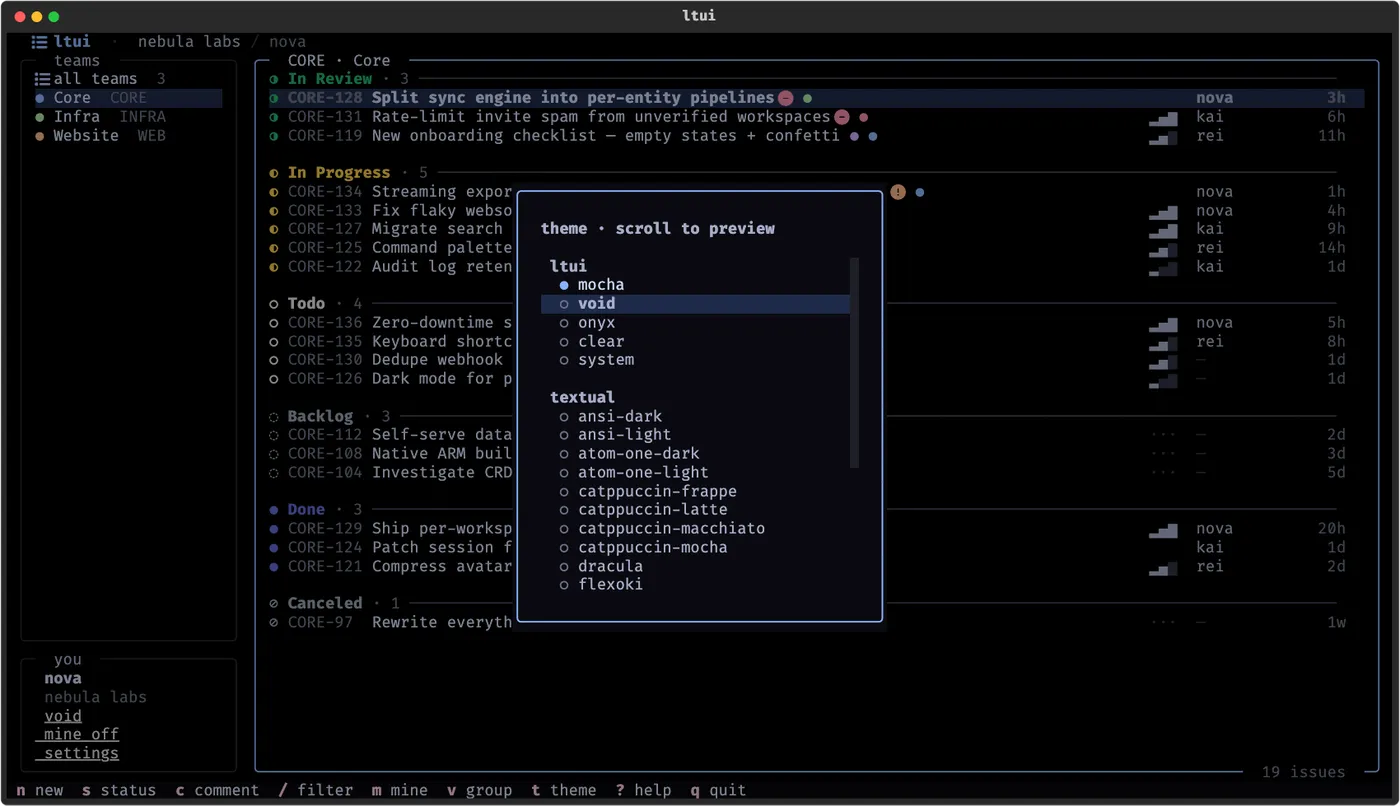
The practical response is graceful degradation: textual labels cannot depend entirely on icons, layout state must survive resize events, and themes should work with the terminal rather than assuming one background. ltui includes five themes, including a transparent theme and a system theme based on the user's ANSI palette.
Text does not guarantee accessibility
TUIs can be excellent for keyboard operation and remote access, but complex screen-oriented rendering can remain difficult for screen readers. Mouse support does not solve that, and neither does a high-contrast theme. Accessibility needs to be evaluated as a real compatibility surface rather than claimed as an automatic property of the terminal.
That means maintaining complete keyboard paths, never encoding essential meaning in color alone, offering plain command output where it makes sense, and testing with the assistive tools users actually rely on. This remains an area where the broader TUI ecosystem has more work to do.
Testing the screen is still immature
The interface is stateful like a GUI but deployed like a CLI, which makes it easy to test business logic while barely testing interaction. A 2026 survey of 197 open-source TUIs found that only 12% of their test code exercised the interface, and many of those tests checked only a static frame without sending input (Alonso et al., Can LLMs Test Terminal User Interfaces?).
That gap should shape how projects are built. Deterministic demo data, repeatable screenshots, input-driven tests, and separation between tracker-specific adapters and interface behavior are not polish to add later. They are the machinery that lets a TUI evolve without quietly breaking its muscle memory.
Building one interface for three trackers
ltui began as a Linear terminal client. It is now a suite:
The three applications share roughly 80% of their code through an adapter layer. Keys, themes, panels, filtering, caching, and navigation stay consistent. Tracker-specific behavior does not get flattened away: Jira status updates remain workflow-aware transitions, while Shortcut exposes its native story types.
This is a useful boundary for any cross-platform tool. Share the interaction model; adapt the domain model. If every integration invents its own keys, users lose the muscle memory that made the TUI valuable. If every service is forced into one generic schema, users lose the capabilities that made their tracker valuable.
The suite is open source under GPL-3.0, with commercial licensing available for uses the GPL does not cover. It runs on Python 3.11 or newer and installs directly from the repository with uv tool install or pipx:
uv tool install "git+https://github.com/runpantheon/ltui#subdirectory=ltui"
ltui
The Jira and Shortcut packages follow the same pattern. Authentication is guided on first launch, and each application talks directly to its tracker rather than proxying credentials through Pantheon.
The engineer behind the suite
ltui started with Gheat, a full-stack and systems engineer at Pantheon who has been treating terminal software as a design discipline rather than a retro aesthetic.
That distinction runs through his open-source work. ricekit extracts the themes, widgets, modals, icons, and interaction patterns behind the suite. NaviTui applies them to a terminal music player. tuistore turns discovery and installation into a terminal application of its own.
The projects share a point of view: a TUI should open quickly, remember how it was arranged, work with both keys and a mouse, and look intentional without confusing ornament for usability.
They also show what individual open-source work can become with institutional support. ltui earned its first users and stars in Gheat's repositories before moving into the Pantheon organization. The move preserved his authorship while giving the tracker suite a company-backed home for continued development. Its copyright and project history name both Gheat and Pantheon.
That is the relationship we want open-source work at Pantheon to have with its creators: spotlight the engineer, preserve the provenance, and supply the maintenance surface that helps a useful personal project become durable infrastructure.
A growing community, not just a trend
The most encouraging signal is not a star count. It is what happens between projects.
When the creator of Network Doctor shared a Bubble Tea application for diagnosing where a connection fails, Gheat offered to make it installable through tuistore. The author offered to contribute in return. That small exchange in r/tui is how an ecosystem begins: one maintainer improves another project's distribution, and a user becomes a potential contributor.
There is healthy skepticism too. Discussions about the TUI resurgence routinely ask whether a new application is more than a “GUI made of text,” whether it is accessible, and whether it improves on tools that have existed for decades. Those are good questions. The terminal does not need weaker copies of every website. It needs applications shaped around workflows the terminal makes better.
For an issue tracker, the case is context and speed. For a network diagnostic tool, it is composing familiar probes into one legible answer. For an application catalog, it is resolving installation across fragmented package managers. The interface follows the problem.
What we would tell someone building a TUI now
Start with the repeated interruption, not the visual treatment. If the application would not be useful in monochrome, a theme will not save it.
Render something meaningful before the network returns. Keep keys stable across screens. Provide a path for discovery before asking users to memorize shortcuts. Test sequences of input, not only final frames. Generate screenshots from fake data. Treat narrow terminals, missing glyphs, accessibility, and interrupted connections as normal environments—not edge cases.
And participate in the community as a maintainer rather than a promoter. Answer detailed questions. Help another application reach a package manager. Document the part that was hard. The useful afterlife of an open-source launch is not another announcement; it is the next person having an easier time building.
We first introduced the suite in our launch thread on X. Since then, the more interesting story has become the work around it: three trackers, one shared design system, a growing catalog of neighboring tools, and an engineer turning a distinct idea of terminal usability into open-source software.
Explore ltui on GitHub, try the tracker you use, or read the contribution guide if there is a workflow you want to improve. The terminal UI community is growing because builders keep showing their work—and then keep working on it together.
Pantheon Engineering
Expert in manufacturing technology and industrial solutions, sharing insights on the latest trends and best practices.
View all articles by Pantheon Engineering